Productbeschrijving
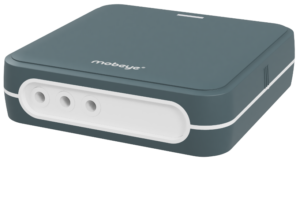
De Mobeye CM-Guard is de controle-unit en 4G communicatiemelder voor de bewaking van iedere technische installatie. Universeel, betrouwbaar en compact. Op eenvoudige wijze worden sensoren en contacten op de ingangen aangesloten. De melder werkt volledig batterijgevoed, of met externe voeding. De ingebouwde communicatiemodule kan zich met het 4G LTE-M en het 2G netwerk verbinden.
Voor deze alarmering hoeft u geen abonnement te nemen. Elk spanningsvrij schakelcontact kan dienstdoen om een alarm te genereren.4G communicatiemelder heeft hiervoor 2 ingangen.
Toepassingen
- Bewaking van NO/NC contacten
- Machinebewaking
- Sensorbewaking
- Melder voor brandalarmsysteem
- Beregeningshaspel
- Pompbewaker
Werking
Alarm-melding: 1 tot 5 telefoonnummers
Bij gebruik van een externe spanningsbron bewaakt de Mobeye CM-Guard direct ook of de stroomvoorziening aanwezig is. Bij het wegvallen ervan, stuurt hij een melding; naar keuze via pushbericht, spraakoproep, sms en/of e-mail. Op de spanningsingang kan een gereguleerde 12-24V DC spanningsbron aangesloten worden, of een netstroomadapter.
Hiervoor kunt u tot 5 verschillende telefoonnummers instellen die bij een alarm moeten worden gebeld. Zodra één hiervan de alarmoproep bevestigt worden de andere nummers niet meer gebeld. Zodra de spanning wegvalt, nemen de interne batterijen de werking over en volgt een melding. De ingangscontacten en aangesloten sensoren blijven bewaakt worden. Als de stroomvoorziening zich weer herstelt, volgt ook een seintje.
Stroomuitvalmelding met netadapter
In combinatie met een externe adapter (kies optie: met netvoeding + kabeltje) krijgt u ook een SMS bericht wanneer de netspanning uitvalt. Dat is vaak is de eerste indicatie dat er iets bijzonders loos is. De 4G communicatiemelder werkt minimaal één jaar op een setje batterijen en meldt zelf wanneer deze bijna leeg is.
De 4G communicatiemelder kan veel
De compacte 4G communicatiemelder heeft veel instelmogelijkheden, zoals SMS of oproep, in – en uitschakeltijden, alarmteksten naar eigen keus, uitgesteld alarm en testberichten. De batterij is inbegrepen. Met een 2G simkaart (wordt standaard meegeleverd vanuit de fabrikant of deze zelf naar keuze aanschaffen) is hij direct inzetbaar. Tip: Met uw eigen gsm kunt u vooraf controleren of er voldoende signaal van het mobiele netwerk op de gewenste plek aanwezig is.
Klik op de volgende link om de simkaart kosten van de standaard meegeleverde simkaart vanuit de fabrikant te bekijken: https://www.mobeye.com/sim-portal [mobeye.com]
Meerwaarde sim/portal
Als simkaart adviseren we de meegeleverde Mobeye simkaart te activeren. Hiermee communiceert het apparaat via zowel 4G LTE-M als 2G en ís “multi-provider”. Het kiest het sterkste netwerk ter plaatse, heeft een zeer goede doordringbaarheid en geeft dus een betrouwbare verbinding. Met de Mobeye simkaart is het apparaat ook verbonden met de Mobeye Portal en de Mobeye Messages app. Dit geeft extra zekerheden en gebruikersvriendelijkheid. Op het dashboard is de status van één of meerdere apparaten in één blik te zien. De programmering gebeurt online, het binnenkomen van testmeldingen wordt automatisch gecontroleerd, bij problemen worden contactpersonen gewaarschuwd via app, oproep, sms en/of e-mail. Doormelding naar een meldkamer (PAC) is ook mogelijk. De simkaart kost € 4/maand* excl. BTW (flat fee bij normaal gebruik), (jaarlijkse) betaling is online, of -op verzoek- op factuur. Inzetbaar in heel Europa. *Let op: prijzen kunnen afwijken. Zie link hieronder voor de actuele prijzen.
Een eigen simkaart is ook mogelijk (NL: KPN of Vodafone, géén t-Mobile of dochters). Het apparaat werkt dan (enkel) via 2G en de Mobeye Portal functies vervallen. Bij alarm zal het bellen en/of sms’en (naar max. 5 nummers). Let op dat een prepaid kaart vervalt als de kaart te lang niet wordt gebruikt.
Klik op de volgende link om de simkaart kosten van de standaard meegeleverde simkaart vanuit de fabrikant te bekijken: https://www.mobeye.com/sim-portal [mobeye.com]
Demo portal alle modellen
Via onderstaande gegevens kun je voor alle modellen inloggen op een demo portal. Hier kun je het model naar keuze kiezen en inzien wat je allemaal kunt instellen, bekijken en aan gegevens kun bijhouden en terugkijken.
Demo Portal:
URL: mymobeye.com
Gebruikersnaam: guest
Wachtwoord: mobeye
Tip zet het scherm via het wereldbolletjes rechtsboven op “Nederlands”.
*Let op: bij aankoop van sommige producten op onze webshop is een basiskennis van elektrotechniek vereist (voor installatie).